
 Drea
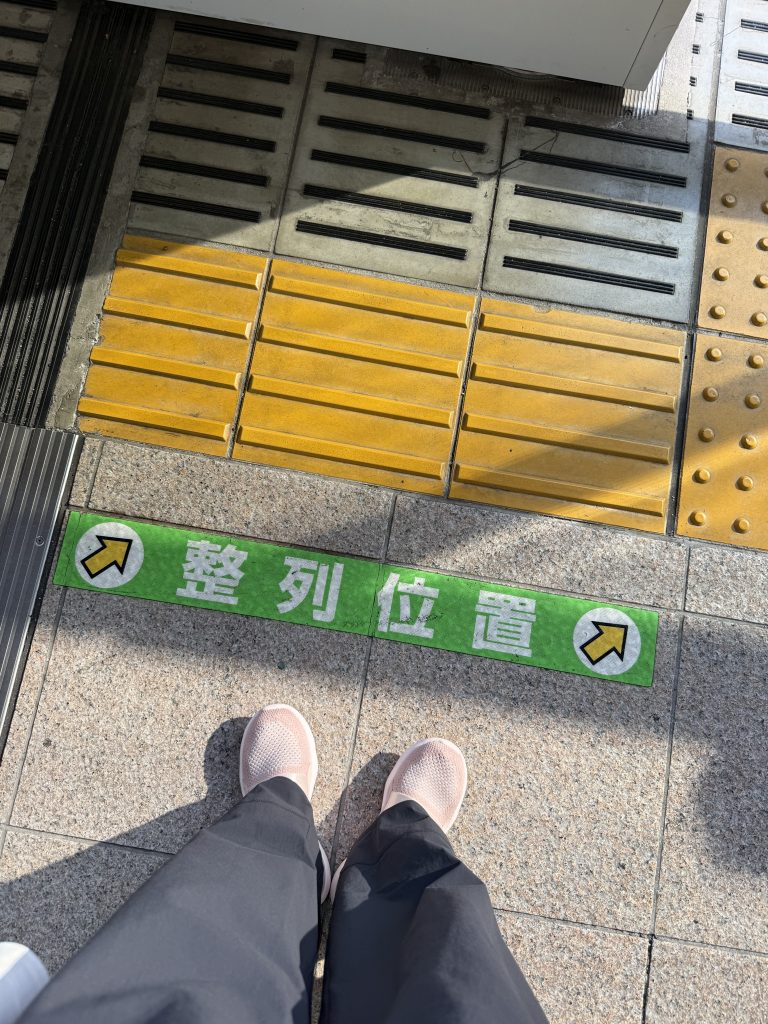
Drea There I am in Tokyo at 9pm, standing in Shinjuku Station – which has, I kid you not, 200+ exits – and my phone’s at 12%. I’m trying to figure out if I need the Marunouchi Line or the Mita Line to get back to my hotel, and how to even find the right train platform in this gigantic station. This was me on night two in Japan, and thank goodness for the travel apps I’d downloaded before I left.
After 45+ countries and now working as a travel advisor, I’ve downloaded approximately one million travel apps. Okay, maybe not quite that many. But here’s what I’ve learned: most “essential travel apps” lists are bloated nonsense designed to hit a magic number (10! 15! 20!) rather than tell you what actually matters.
The honest truth: I keep exactly 5 apps on my phone that I use on every single trip. That’s it. Five.
If you’ve read my Japan travel tips or girls trip planning guide, you’ve seen me mention some of these before. But this is the complete picture – what I actually use, what I’ve deleted, and why the difference matters.
No sponsored recommendations. No padding the list to hit a number. Just the 5 apps that have genuinely changed how I travel – plus a peek at the professional tools I use as a travel advisor when stakes are higher.
Add this One to the Toolkit
Love a good travel tool? My free custom packing checklist is the analog one that saves me every single trip.
My Essential Travel Apps at a Glance (Featured Snippet Target)
How to use this guide: If you’re in a rush, this table tells you what to download. Keep reading for why each app made the cut, what I deleted, and when you need professional tools instead.
| App | Purpose | Cost | Offline | Why |
|---|---|---|---|---|
| Google Maps | Navigation & local discovery | Free | Yes* | Universal navigation, transit, restaurants, custom lists |
| Google Translate | Language barriers | Free | Yes* | Camera, voice and word translation, offline packs |
| Airalo | International data | Varies | No (it IS your data) | Avoid $12/day+ carrier charges |
| Global communication | Free | No | How the world outside US communicates | |
| TripIt | Trip organization | Free/$49 | Yes | All confirmations in one place |
*Requires pre-download for offline functionality
PLUS: Splitwise (Free) – Essential for group trips or if you want to consolidate your trip expenses to see how much you spent; handles shared expenses and prevents money drama.
What Makes a Travel App Actually Worth Downloading?
My Three Non-Negotiables

Before an app earns a permanent spot on my phone, it has to meet these criteria:
1. Works offline (or mostly offline)
There’s nothing worse than an app that’s useless the moment you lose WiFi. In rural Italy, I lost cell service on a bus to a mountain town. Thank goodness I’d downloaded offline maps and had hotel details saved in TripIt.
2. Solves a specific problem better than what’s already on my phone
Your phone already has a calculator, notes app, and basic maps. If an app doesn’t do something meaningfully better, it doesn’t earn space or battery drain.
This is why I deleted: XE Currency (calculator works), Trail Wallet (don’t need daily budget tracking), PackPoint (I know what to pack after 45+ countries).
3. Doesn’t drain battery or need constant updates
Phone battery while traveling is precious. Apps that run in the background or need WiFi to update before working? Deleted.
What about those “best apps” lists?
Most are either affiliate-heavy, padded to hit a number, or not actually tested. I’m showing you what I actually use. Nothing more, nothing less.
The philosophy: Ruthless minimalism. Every app earns its keep or gets deleted.
The 5 Travel Apps I Actually Use on Every Single Trip
1. Google Maps – The Universal Solution

What it does: Offline maps, real-time transit directions, local business search, saved locations
Why it’s essential:
Before Google Maps, I juggled multiple apps – one for navigation, one for transit, one for restaurants. Google Maps replaced them all.
Key features:
- Offline maps: Download entire cities before departure
- Saved lists: Create lists like “Tokyo Restaurants,” refer to it on your trip and/or share with travel companions
- Transit directions: In Tokyo, it told me which subway car to board for efficient exit
Real-world example:
I’ve used Google Maps extensively in Japan for navigating subways and finding restaurants, but I rely on it equally in Portugal, Greece, and California. The compass showing which direction I’m facing has saved me countless times in winding European streets (potentially after I may or may not have walked back and forth down the same road before referring to said map 🫣).
Why I skip Citymapper: Google Maps works everywhere and does 95% of what Citymapper does. Not worth having a second navigation app for marginally better detail in only ~80 cities.
Cost: Free | Works offline: YES | Storage: ~300MB per major city
2. Google Translate – Breaking Language Barriers
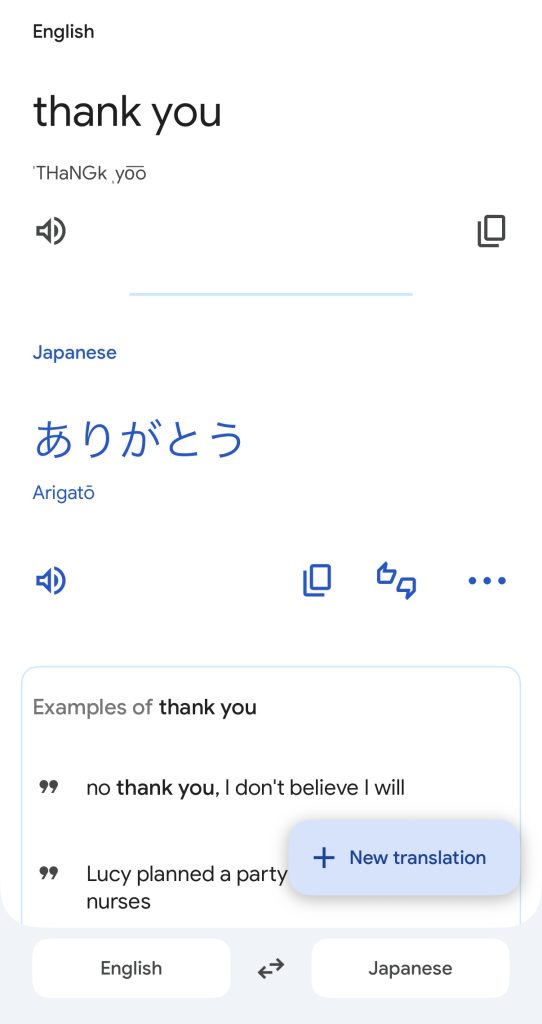
What it does: Text translation, camera translation, conversation mode, offline translation packs
Why it’s essential:
Camera mode is pure magic – point at a sign or menu and it translates in real-time, overlaying text on the original. It also helps when you know the English word but want the local equivalent, as you can either type in words or use voice mode.
Real-world examples:
In Japan, I used Google Translate for:
- Typing in and saving the most common phrases so I could be respectful (eg, Thank You, Excuse Me, Please, etc)
- Ordering at restaurants with no English menus (camera mode saved the day)
- Speaking into the app in English and using voice mode to translate it to the local pharmacist
This app works everywhere. It’s been essential in Greece (ferry schedules), Portugal (shop conversations), and Italy (my basic Italian only gets me so far).
The honest caveat: Sometimes translations are hilariously wrong. One Japanese menu item became “violent rainbow.” Use it for getting the gist, not legal documents or serious medical situations.
Conversation mode: For basic two-way exchanges (asking directions, ordering food), the app works surprisingly well.
Cost: Free | Works offline: YES (with downloaded packs) | Battery drain: Minimal unless using camera mode constantly
Airalo (eSIM) – Never Pay $12/Day Again
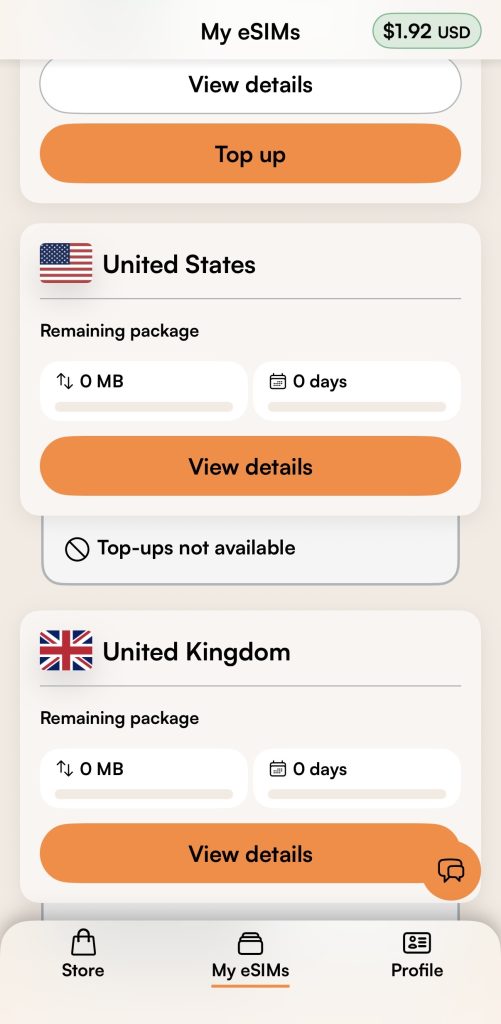
What it is: eSIM marketplace for international data plans
Why it’s essential:
Before eSIMs: You would pay your carrier a daily rate for limited data ($12 and up) OR hunt for local SIM shops (what I did in Italy before eSims came along). Airalo eliminated both headaches.
How it works:
- Download the app before trip
- Purchase an eSIM for your destination
- Download the eSIM (2 minutes)
- Activate it on landing
- Have data before leaving airport
Cost comparison:
For my Japan trip, I got 20GB for 30 days for $23 (use my referral code ANDREA68732 for $3 off). Verizon wanted $12/day with limited data.
18-day trip:
- Verizon: $216 for limited data
- Airalo: $23 for 20GB
- Savings: $193
Requirements: Phone must support eSIM (iPhone XS and newer, many newer Androids). Check Airalo’s compatibility list.
Cost: around $4.50-$25, varies depending on amount of data and length of time | Works offline: NO (it IS your data connection to keep you online)
4. WhatsApp – How the World Actually Communicates
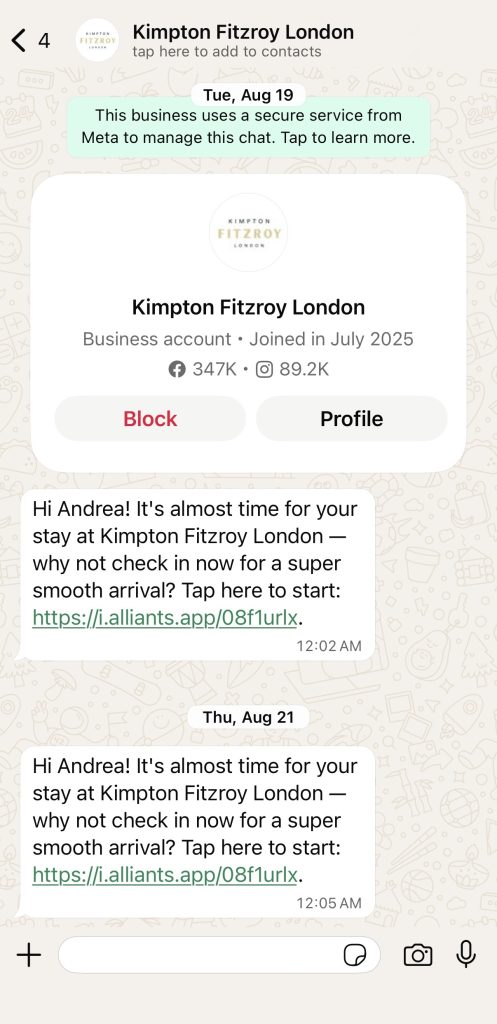
What it does: Messaging and calls over WiFi/data, voice messages, photo sharing, end-to-end encryption
Why it’s essential:
Every hotel outside the US. Every tour operator. Every local guide. They all communicate via WhatsApp. This isn’t optional – it’s essential.
eSIM tip: Since eSIMs provide data but not voice/SMS, WhatsApp becomes your calling and texting solution – all running on your data plan with no extra charges.
Real-world examples:
- Cotswolds guide: coordinated logistics via WhatsApp
- Tanzanian boat tour: confirmed times and pickup locations via WhatsApp
- Italian hotel: coordinated check-in via WhatsApp
- Japanese ryokan: answered onsen questions via WhatsApp
For group travel:
As I covered in my girls trip guide, WhatsApp group chats handle:
- Coordinating meeting spots
- Sharing real-time photos
- Voting on restaurants
- Quick “running late” updates
Voice/video calls: Better quality than international calls, and free over WiFi. I had crystal-clear calls with people from Japan, Italy, and Scotland.
Cost: Free | Works offline: NO (needs WiFi or data) | Battery: Can drain if in very active group chats
5. TripIt – Everything in One Place
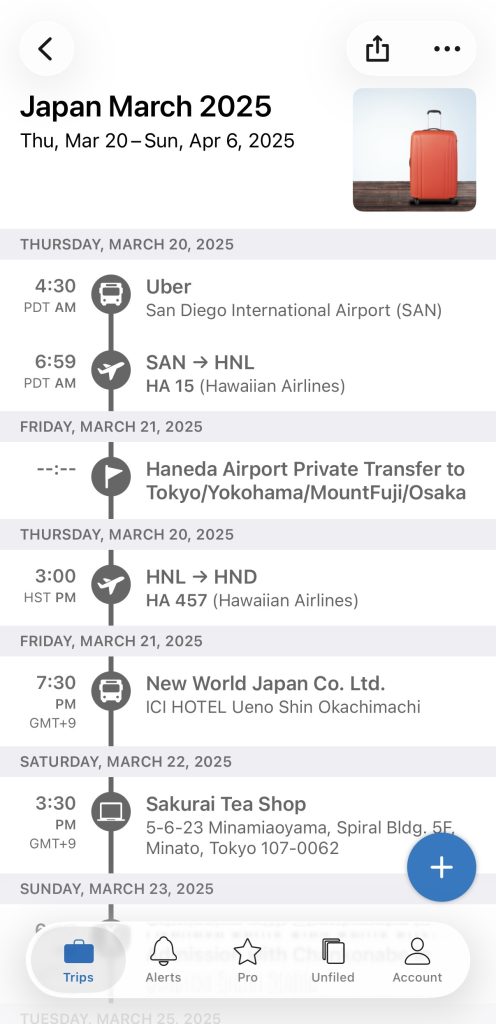
What it does: Automatically organizes travel confirmations into unified, chronological itinerary
Why it’s essential:
Pre-TripIt: I was scrolling through 47 emails at the airport check-in looking for confirmation numbers. TripIt eliminated that chaos.
How it works:
- Forward confirmation emails to plans@tripit.com
- TripIt extracts relevant info
- Creates a clean timeline
- That timeline is accessible offline
What it organizes: Flights, hotels, car rentals, restaurant reservations, activities, train tickets
Killer features:
- Offline access to all confirmation numbers
- Shared itineraries for family/travel companions
- Calendar sync (automatically)
- One-tap address opening in Google Maps
Real-world example:
When my Cabo flight was delayed, TripIt notified me before my airline carrier did. It also made my airport pick-up confirmation number and contact information easily accessible – even with spotty internet. I messaged them in WhatsApp and changed my pickup time. No email searching.
Free vs. Pro: The free version handles itinerary organization and offline access. Pro ($49/year) adds real-time flight alerts, seat tracking, and alternate flight suggestions. I pay for Pro because flight alerts alone have saved me multiple times.
Cost: Free (Pro $49/year) | Works offline: YES
Bonus for Group Trips: Splitwise

What it does: Tracks group expenses, calculates who owes whom
Why it’s essential:
Solo travel? Don’t need this unless you’re curious about how much you’re spending all in on a trip. Group trips? This is clutch – it prevents money drama and ending each meal with math.
Real-world example:
In my girls trip planning guide, I covered how money kills friendships on trips. Six friends splitting Airbnbs, dinners, wine, taxis across a week in Portugal? Without Splitwise: a spreadsheet nightmare. With Splitwise: enter expenses as they happen, settle up at end, zero drama.
The transparency factor: Everyone sees what’s logged. No “did I pay for that?” confusion.
Cost: Free | Works offline: Limited (needs sync to calculate)
Travel Apps Everyone Recommends That I Don’t Actually Use
The Deleted Travel Apps (And Why You Might Not Need Them Either)
Here’s permission to disagree with popular travel advice. I’ve tried these apps. I deleted them. Here’s why.
XE Currency Converter
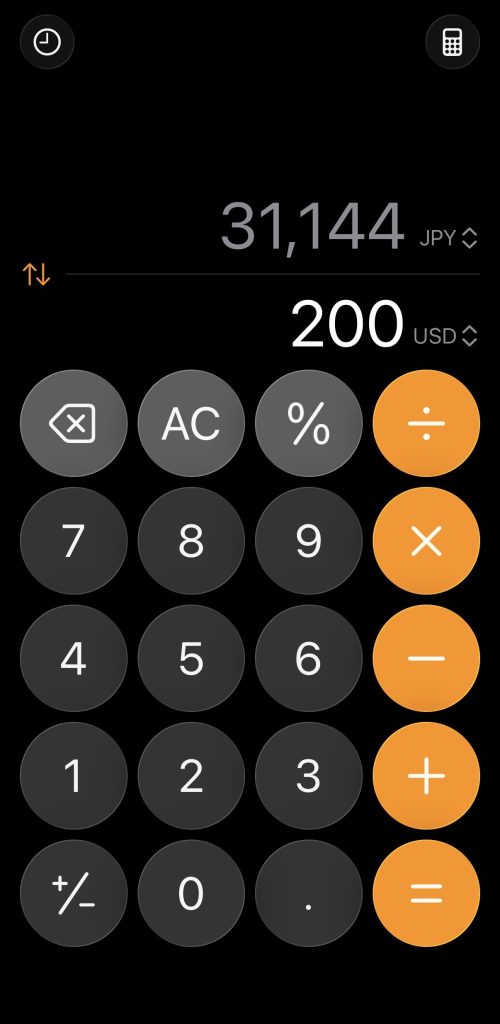
Why I deleted: Did you know your calculator is a currency/weight/weather/all things converter?? My calculator works fine for rough estimates. I’m not making million-dollar currency trades – I’m figuring out if that sweater is $45 or $85. The Calculator app is sufficient.
Who might want it: If you travel to countries with very different exchange rates (1 USD = 1,300 Korean Won) and want exact conversions constantly.
Trail Wallet
Why I deleted: I don’t need daily budget micromanagement. I check my credit card app occasionally. That’s enough.
Who might want it: Budget backpackers, long-term travelers on strict daily budgets, anyone wanting detailed post-trip spending analysis.
Revolut or Wise
Why I deleted: ATMs exist everywhere. I have a credit card with no foreign transaction fees (most good travel cards offer this). For marginal savings, the setup and account management isn’t worth it.
Who might want it: Digital nomads managing money across countries, people without no-fee credit cards, long-term travelers holding multiple currencies.
PackPoint
Why I deleted: After 45+ countries, I know what to pack. I have a 431 packing system that works anywhere.
Who might want it: First-time international travelers, infrequent travelers, people who genuinely forget essentials.
Citymapper

Why I deleted: Google Maps does 95% of what Citymapper does and works everywhere. Citymapper only works in ~80 cities and needs connectivity for its best features.
Who might want it: If you live in a Citymapper-supported city and use it daily.
Other quick travel app deletes:
- TripAdvisor: Google Maps reviews are more current and integrated
- Airline apps: Download for specific trip, delete after (unless you fly that carrier frequently)
- Hotel apps: Your confirmation email has everything you need
Permission to disagree: Maybe you LOVE XE Currency. That’s fine! This is what works for me. Your mileage may vary.
Professional Tools Travel Advisors Actually Use
What Changes When You Go Pro
Ever wonder how advisors create seamless multi-city itineraries? Here’s the toolkit:
GDS Systems (Sabre, Amadeus, Galileo)

The actual airline/hotel booking platforms, not consumer sites. They provide access to different inventory pools, which is why advisors can sometimes find availability when Booking.com shows “sold out.” Learning curve: months. Interfaces look like 1995, but they’re powerful.
Consortia Platforms (Virtuoso, Signature, Ensemble)
These are Membership networks connecting advisors with luxury suppliers. Through my Virtuoso affiliation with Cadence Travel, I can often provide access to room upgrades (subject to availability), resort credits, complimentary breakfast, and VIP recognition. These perks aren’t available to individual bookers, even at the same base rate.
CRM & Research Tools
How do advisors remember you prefer aisle seats and hate early flights? Professional CRMs (Travel Joy, Travefy) track preferences. Research platforms provide hotel inspection reports, not just TripAdvisor reviews.
When Professional Tools Matter
Consumer apps are brilliant for simple trips. Professional tools are designed for complexity – multi-city itineraries, honeymoons, milestone trips. Roughly when trip complexity exceeds 10 hours of quality research or budget justifies planning fees ($5K+ per person), professional tools deliver better value.
The honest truth: I use consumer apps for weekend getaways. But for my three-week Japan trip with my mom? Professional tools, because complexity warrants it.
When to DIY vs. When to Use a Travel Advisor
The Honest Assessment
These 5 consumer apps are powerful – I use them on every trip, even if the trip was planned by an advisor. They can work in tandem, providing a level of comfort and communication whether you planned the trip on your own or had someone do the legwork for you.
The Framework:
🗝️
THE FRAMEWORK
| Use These 5 Apps When: | Use These Apps + A Travel Advisor When: |
| Weekend getaway (2-5 days) | Multi-week international itinerary (14+ days) |
| Direct flights, simple logistics | Complex routing across multiple cities/countries |
| One hotel, one location | Coordinating hotels, transfers, experiences |
| You enjoy the planning process | You want 20+ hours of your life back |
| Trip budget under $3,000 | Trip budget $5,000+ per person |
| You’re comfortable troubleshooting | You want professional support if issues arise |
| Standard accommodation | Honeymoon, anniversary, milestone celebration |
🔌
WHAT THESE TRAVEL APPS CAN DO
| ✅ What These Apps Do Brilliantly: | ❌ What These Apps Don’t Do: |
| ✓ Navigate streets and public transit | ✗ Create optimized routing balancing time, cost, and experience |
| ✓ Translate languages in real-time | ✗ Negotiate room upgrades or VIP amenities |
| ✓ Organize confirmation details | ✗ Access supplier relationships that solve problems when things go wrong |
| ✓ Keep you connected internationally | ✗ Know which “deals” are actually good vs. marketing traps |
| ✓ Handle day-to-day logistics | ✗ Provide 24/7 professional support abroad |
| ✗ Save you 20+ hours of research and coordination |
💡 Perfect for execution – getting from Point A to Point B, communicating with hotels, finding restaurants, and staying connected to home.
My personal framework:

I use these 5 travel apps for:
- Weekend trips to wine country
- Visiting family in other states
- Straightforward beach resort vacations
- Solo adventures where I want spontaneity
I use these apps alongside professional tools for:
- My three-week Japan trip
- Complex multi-city European itineraries
- Milestone celebrations (honeymoons, anniversaries)
- Group travel coordination (6+ people)
Why professional tools for my next Japan trip:
- Complex routing across 6+ cities
- Coordinating mother-daughter travel (different needs, pace)
- Want optimal hotel selections, not just available ones
- My time is worth more than the planning fee
- Trip will be meaningfully better with professional planning
The not-a-sales-pitch truth:
Long weekend in San Diego? These 5 apps are perfect.
Honeymoon in Italy visiting five cities over two weeks? Professional tools plus advisor expertise do the planning, while these apps will help you make the most of your experience there.
You have permission to: Mix and match. Use apps for straightforward trips. Use advisors for complex ones.
How I Actually Use These 5 Travel Apps Together
The Complete Workflow
Before the trip (30-45 minutes setup):
- Airalo: Purchase and download eSIM
- Google Translate: Download language packs
- Google Maps: Download offline maps, create location lists with restaurants, hotels, and attractions
- TripIt: Forward all confirmation emails to plans@tripit.com
- WhatsApp: Add hotel/tour operator contacts, send test message
- Splitwise (if group trip): Create trip group, add travelers
This 30-45 minutes saves literal hours of stress during the actual trip.
During the trip (daily usage):

Morning:
- Check TripIt for the day’s confirmations and addresses
- Review Google Maps for planned locations
- Use WhatsApp to connect with people at home (depending on time zone differences)
Throughout the day:
- Google Maps: Navigate, look up hours and reviews
- Google Translate: Menus, signs, conversations
- WhatsApp: Coordinate with companions, confirm reservations
- Splitwise (if group): Log shared expenses as they happen
Evening:
- Check TripIt for tomorrow’s plans
- Review Google Maps for tomorrow’s planned locations and how to get there
- Download new Google Maps areas if moving to new city
The key insight: Each app does ONE thing exceptionally well. Together they cover navigation, communication, language, connectivity, and organization. No redundancy. No bloat.
Battery management:
- Enable low power mode when battery drops below 30%
- Close apps not actively using (especially WhatsApp in very active group chats)
- Bring a portable charger (non-negotiable)
- Download maps and language packs on WiFi to reduce data usage
Conclusion
After 45+ countries, I’ve learned that less is more. These 5 apps – Google Maps, Google Translate, Airalo, WhatsApp, and TripIt – handle everything: navigation, communication, translation, connectivity, and organization.

But technology enhances travel; it doesn’t define it. I still get delightfully lost, ask locals for recommendations no app would suggest, and have spontaneous adventures no amount of planning could create.
For straightforward trips where you enjoy planning? These apps are perfect. For complex international itineraries, honeymoons, or milestone trips? Contact me about travel advisory services.
Otherwise, download these 5 and go explore. The world is waiting.
Wherever you go, however you get there, I hope you have a trip to remember.
Happy travels, kindreds!
RELATED POSTS
See these apps in action:
- 10 Essential Japan Travel Tips for First-Time Visitors – How I used these apps throughout my 18-day Japan trip
- How to Plan a Girls Trip Without Losing Friends – Why Splitwise is essential for group travel logistics
Ready to plan your next adventure?
- How to Travel in Shoulder Season: Save Money, Skip Crowds – When to use these apps with optimal travel timing
- Take a look at my 2026 planning framework in How to Plan Your Best Travel Year
- My 431 packing system will help make sure you bring only what you need – get your free guide here
HELPFUL LINKS
The 5 Apps Mentioned in This Article:
- Google Maps– Free navigation and local discovery
- Google Translate – Free language translation
- Airalo eSIM – Use my referral code ANDREA68732 for $3 off
- WhatsApp– Free messaging worldwide
- TripIt – Free trip organization (Pro $49/year)
- Splitwise– Free expense tracking for groups
Ready for Complex Trip Planning?
- Contact me for travel advisory services – Multi-week international itineraries, honeymoons, milestone trips, and any other travel needs you have
*This post contains affiliate links. If you book through my links, I may earn a small commission at no extra cost to you.